



Guest User
Login
#0 Rank0 Coins
Dashboard
 Notification
 Coins
CoinsGames Categories
 New Games
Connect with us



 sports
 action
 cricket
 arcade
 racing
 adventure
 girls
girls boys
boys hot
hot moresportsactioncricketarcaderacingadventuregirlsboyshotmore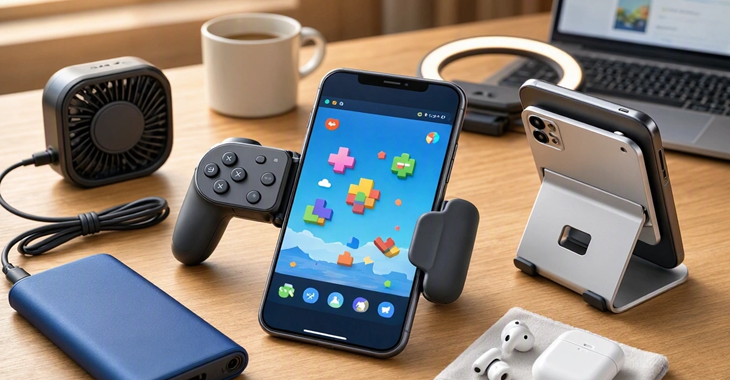
Browser gaming on a phone is slightly different from playing a native mobile game. Compatibility depends not only on the phone and accessory, but also on how the browser game handles touch, keyboard, mouse and gamepad input.
That is where the right mobile gaming accessories can make a difference. You don't need to turn your phone into an expensive gaming machine. A few sensible additions can make browser gaming more comfortable, especially if you regularly play racing, action, arcade or multiplayer games.
The best mobile gaming accessories for browser games are a mobile controller, phone stand, headphones and power bank. A controller is the most useful upgrade for action, racing and arcade games, while a keyboard and mouse may be better for strategy and simulation titles. The right choice depends on whether the browser game supports touch, gamepad or keyboard controls.
If I had to pick just one accessory, it would be a mobile gaming controller.
Touch controls are fine for simple puzzle games or short sessions. But once a browser game needs an analogue stick, shoulder trigger or several buttons at the same time, the touchscreen can become frustrating.
A telescopic controller grips the phone on both sides and turns it into something much closer to a traditional handheld. Current 2026 testing from WIRED includes USB-C controllers such as the Backbone One and GameSir G8 Galileo, with features such as pass-through charging and programmable controls on some models.
For browser gaming, check these things before buying:
Android or iPhone compatibility
USB-C or Bluetooth connection
Full-size analogue sticks
Comfortable grips
Pass-through charging
Button remapping
Support for your browser and device
Don't assume every controller will work perfectly with every browser game. The game itself also needs to recognise gamepad input.
A controller isn't useful simply because it looks more like a console accessory.
It changes how you interact with the game.
Imagine playing a browser racing game. Steering with an on-screen button can work, but an analogue stick gives you more control. The same goes for platform games where timing and movement matter.
Modern browsers provide the Gamepad API, which allows websites to detect compatible controllers and read inputs such as buttons and analogue sticks. However, the browser API doesn't automatically add controller support to a game. The developer still has to implement gamepad controls.
There is one catch: controller support depends on the individual game. Some browser games are built for touch, some expect keyboard and mouse, and others support gamepads properly.
Not every game needs a controller.
For slower games, strategy titles, card games or browser games that rely mainly on touch, a simple phone stand can be more useful.
Instead of holding your phone for an hour, place it at a comfortable angle and play with your hands free.
A stand is particularly handy if you use a separate Bluetooth controller.
You can create a simple setup like this:
Phone → Stand → Bluetooth controller → Headphones
It is inexpensive, portable and doesn't require buying a dedicated handheld.
Sound is easy to ignore until you're playing somewhere noisy.
A decent pair of wired or wireless headphones can make browser games feel much more immersive, particularly games with music, sound effects or voice audio.
For mobile gaming, I would look for:
Comfortable fit
Low-latency wireless mode, if available
Good microphone quality for multiplayer
Reasonable battery life
Easy device switching
You don't necessarily need expensive gaming headphones. Comfort matters more if you're playing for long periods.
There is nothing particularly enjoyable about watching your phone drop from 30% to 5% while you're in the middle of a game.
Browser gaming can be demanding, particularly when the game uses detailed graphics, animation and continuous network activity.
A power bank makes sense if you play while travelling.
Look for one with enough capacity for your phone and USB-C output that matches your device's charging requirements. If your controller supports pass-through charging, you may be able to charge the phone while the controller remains connected. Check the manufacturer's specifications because charging behaviour and power delivery vary between models.
Phones are not designed exclusively for gaming.
If you're playing a demanding browser game for a long time, the device may become warm. Heat can eventually affect sustained performance, particularly if the phone starts reducing performance to control temperatures.
You don't need an elaborate cooling system for ordinary browser games.
But if you regularly play graphics-heavy titles, a small clip-on phone cooler can be worth considering.
I'd treat this as an optional accessory, not something every casual player needs.
Browser games often depend on an internet connection, especially multiplayer titles.
That means a fancy accessory won't solve the problem if your connection keeps dropping.
For home gaming, a stable Wi-Fi connection is usually enough. If you're playing competitive browser games, however, consistency matters more than having the fastest advertised download speed.
When possible:
Stay reasonably close to the router
Avoid crowded Wi-Fi locations
Use a reliable 5GHz/6GHz connection when supported
Consider wired networking when using a compatible dock
For mobile gaming away from home, a stable cellular connection can be more important than raw speed.
These are worth considering if your favourite browser games are designed around traditional PC controls.
A keyboard and mouse can be particularly useful for:
Strategy games
Management games
Browser-based simulations
Typing games
Games with lots of shortcuts
A controller isn't automatically better.
Some browser games simply make more sense with a mouse. Clicking small interface elements with an analogue stick can quickly become annoying.
Accessory | Best for | Priority |
Power bank | Travel gaming | Medium |
Headphones | Sound and multiplayer | Medium |
Phone stand | Longer sessions | High |
Mobile controller | Action, racing, arcade | High |
Phone cooler | Long demanding sessions | Optional |
USB-C hub/dock | Larger-screen gaming | Optional |
Bluetooth keyboard/mouse | Strategy and simulation | Game dependent |
This is probably the easiest way to waste money. Before ordering anything, open the browser game you actually want to play and check its control options.
Does it support touch?
Does it recognise a gamepad?
Does it require keyboard input?
Does the game work properly in your phone's browser?
The Gamepad API is widely available, but browser and controller behaviour can still vary, and individual games have to implement controller support themselves.
That means a £50 controller isn't particularly useful if your favourite browser game only accepts touchscreen input.
For most people, I'd keep the setup simple.
Casual player: phone + stand.
Action or racing fan: phone + telescopic controller.
Long-session player: controller + stand + headphones.
Frequent traveller: controller + power bank.
Strategy gamer: phone/tablet + keyboard and mouse.
That's really the point of choosing mobile gaming accessories carefully. You don't need to buy everything.
A good controller can make a bigger difference than a bag full of unnecessary gadgets. And if your browser games are mostly simple touch-based titles, you may not need an accessory at all.
Atmegame.com is a completely new platform for the online games lovers.The best part is that all games available on our website are free and can be enjoyable on multiple devices, including desktop, mobile phones, tablets, and iPhones or iPads.
